- open auctioneer perform the fast scan by pressing the >> button.
- after the scan completes go to the search field and select snatch. It should be below resale.

- in this screen drag or drop the item you want to bulk buy. In my case netherweave.
- Next you need to set the price per item you want to pay. I set mine to 50s per piece of netherweave. This means the most expensive cost of my mats is 10g per stack.
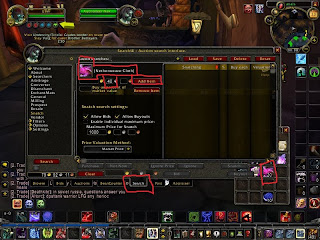
- after getting this set you click the add button then click search to let the snatch populate and show you all the items in the range of what you want to pay.

- after the list is populated its time for keyboard twister press ctrl alt and shift this turns the purchase button into a purchase all button. Click it and the addon should que up all the items for purchase.
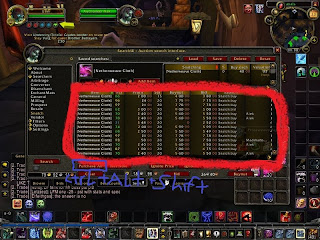
- you can see the total cost of items in the lower left hand corner next to the stop button. If you don't wish to spend the total you can buy what you want then use the stop button to clear the buy que.
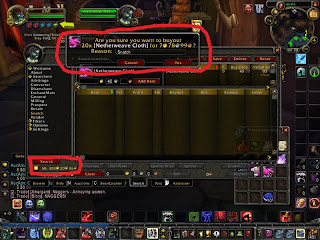
- click yes on the pop up that appears to purchase items do this until all items are purchased or until you reach the limit of what you wish to spend.
- Go clean out the mailbox and get to crafting snatch just made it easy to buy over 100 stacks of cloth in 15 minutes.
Another quick point if your only snatching one item it is quicker to just search that item instead of a full scan go through the pages of the item. Then use snatch the auctioneer DB updated the view on netherweave when you viewed all the pages allowing you to snatch in 5 minutes. Instead of having to wait for a scan to finish.
